
Custom Enterprise Systems & SaaS Development
Two kinds of build: internal systems shaped to your industry ERPs, CRMs, and workflow platforms and SaaS products you take to market, with multi-tenant architecture, subscriptions, and usage-based billing.
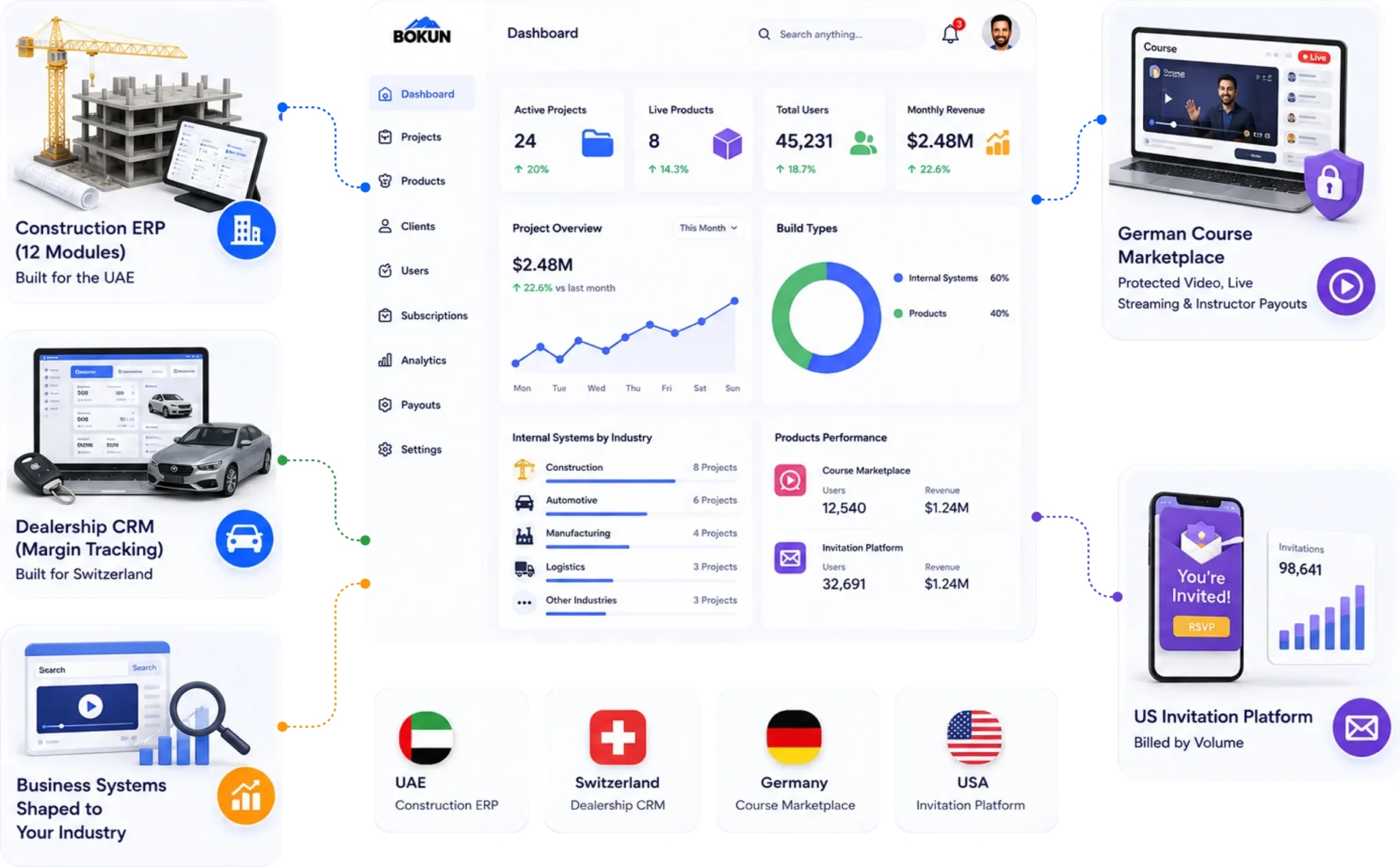

Construction ERP · Dealership CRM · Course marketplace · SaaS products
· UAE · Switzerland · Germany · USA
Two Different Problems, One Kind of Engineering .
If the software runs your business: you’re working around it. There’s a spreadsheet beside the ERP holding the part it couldn’t handle — usually the part that matters most. Your team translates industry terminology into the system’s terminology every day. Quotes live here, project costs there, purchase orders in email, and margin gets worked out manually at month-end. There’s a process you can’t improve because the software won’t allow it. And per-seat licensing punishes you for growing, on modules you never switch on.
If the software is your product: the hard parts aren’t on your feature list. Protecting content you sell so it can’t be copied. Billing that meters real usage. Access that unlocks the moment payment clears and not before. Paying your supply side without manual reconciliation. Live sessions that hold up under load. Tenant isolation you’ll wish you’d designed for before your second enterprise customer asks about it.
Different buyers, same discipline: get the data model and the access rules right at the start, because both are effectively permanent once you have real users.
Two Kinds of Build
Internal Systems and Products You Sell
Worth being explicit, because these are different projects with different buyers.
Internal Systems
For the company that runs on them : ERP, CRM, and HRMS used by your own staff. Success is hours saved, errors eliminated, and decisions made on current data instead of last month’s export. The buyer is usually operations or IT leadership.
Built in:
- Struct – construction ERP, UAE
- Wowin – dealership CRM, Switzerland
Products You Sell
For the company taking software to market : Software and digital content your customers pay to access. Success is signups, retention, and unit economics. Billing, entitlement, content protection, supply-side payouts, self-service onboarding. The buyer is usually a founder or product leader.
Built in:
- MyLearnPlace — course marketplace, Germany a
MyInvite – Invitation SaaS, USA
A note on My Learn Place: It’s both a product and a multi-sided marketplace — instructors publish and earn, the operator runs the platform and takes a margin. If that’s your model, the Marketplace & Mobility page covers the supply-side and payout engineering in more depth.
Featured Builds
Platforms We’ve Shipped
Struct
Construction ERP UAE
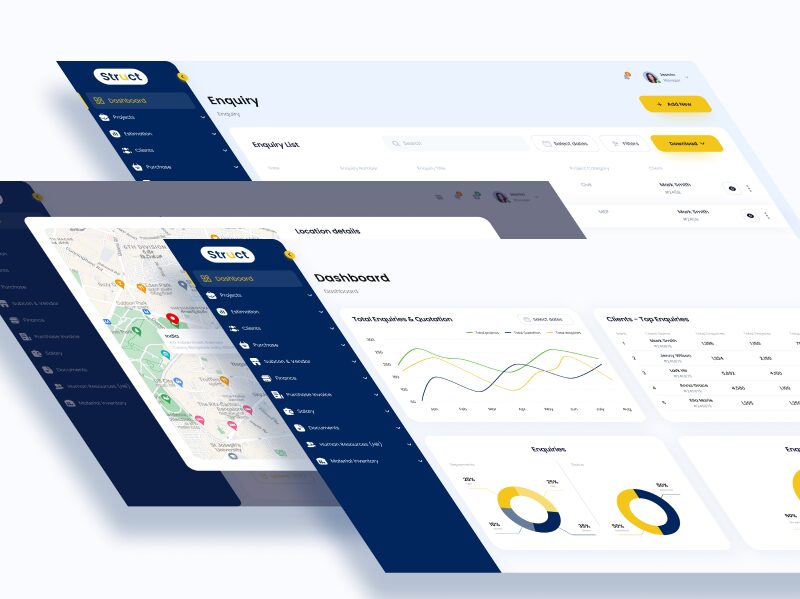
- A full construction ERP covering the project lifecycle in twelve integrated modules: Marketing, Estimation, Subcontractor & Vendor, Purchase, Documents, Finance, HR, Vehicle & Inventory, Project, Reports, and Admin.
- A customer The construction-specific spine. Enquiry → estimation → quotation → won project → subcontract packages → procurement → cost tracking. That chain is how construction businesses actually operate, and it’s what generic ERP handles worst. Estimation and subcontractor management have no good off-the-shelf equivalent for a mid-size contractor.
- One connected pipeline. Enquiries, quotations, and projects tracked on a single timeline, with enquiry breakdowns by department and status. Because estimation, procurement, and finance sit in one system rather than three, project cost is visible while the project is still running — not reconstructed after it closes.
- Operational modules alongside the commercial ones. HR, fleet and inventory, and document control in the same platform, so plant, people, and paperwork attach to the projects consuming them.
- Projects managed
- Users across departments
- Quotation turnaround improvement
- Reporting time reduced
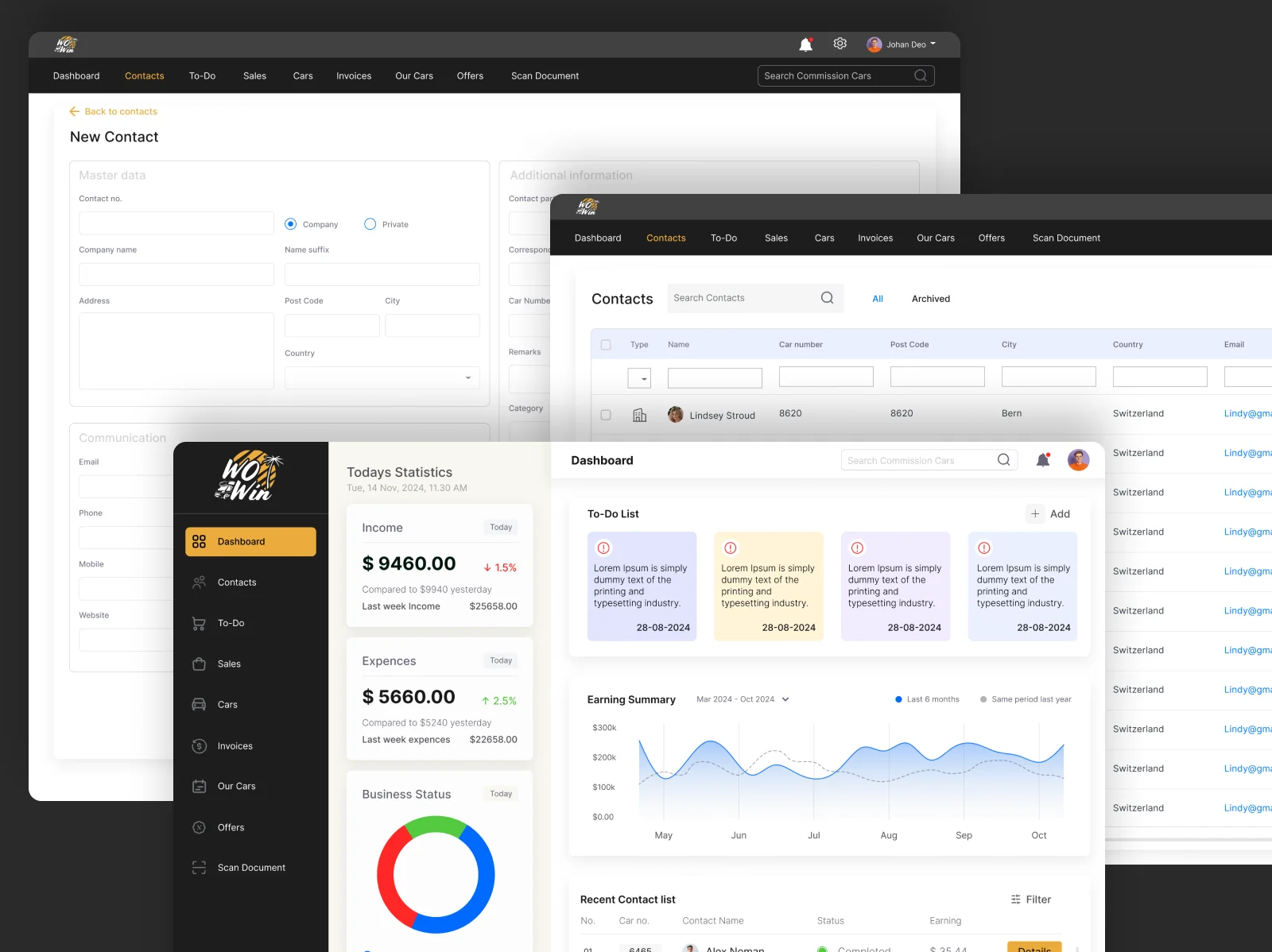
Wowin
Campervan Dealership CRM Switzerland
- A CRM built for a Swiss campervan buying and selling business, shaped around the unit economics of vehicle retail rather than generic contact management.
- Owned versus consignment stock. The system separates vehicles the dealership owns from commission vehicles sold on behalf of others — currently 92 vehicles across both, split by new and Occasion. Those two categories behave completely differently in cash flow, margin, and obligation, and almost no generic CRM models the difference.
- The hard parts: Cost and margin per vehicle. Costs, invoices, and finances track against the individual unit, so margin is known per vehicle rather than estimated across the month. Where every item of stock is unique and carries its own preparation cost, that’s the whole point of the system.
- Demand matching. A “Customer is looking” register captures buyer requirements and holds them against incoming stock, so an arriving vehicle can be matched to a waiting buyer instead of sitting on a forecourt.
- Document capture. Built-in scanning, because vehicle sales generate registration, inspection, and finance paperwork that has to attach to the right unit.
- Task layer. Normal and important task streams plus a to-do register, structured by calendar week the way the business already plans.
- Vehicles Under Management
- Average Days To Sale
- Admin Hours Saved Weeklyd
- Match Rate
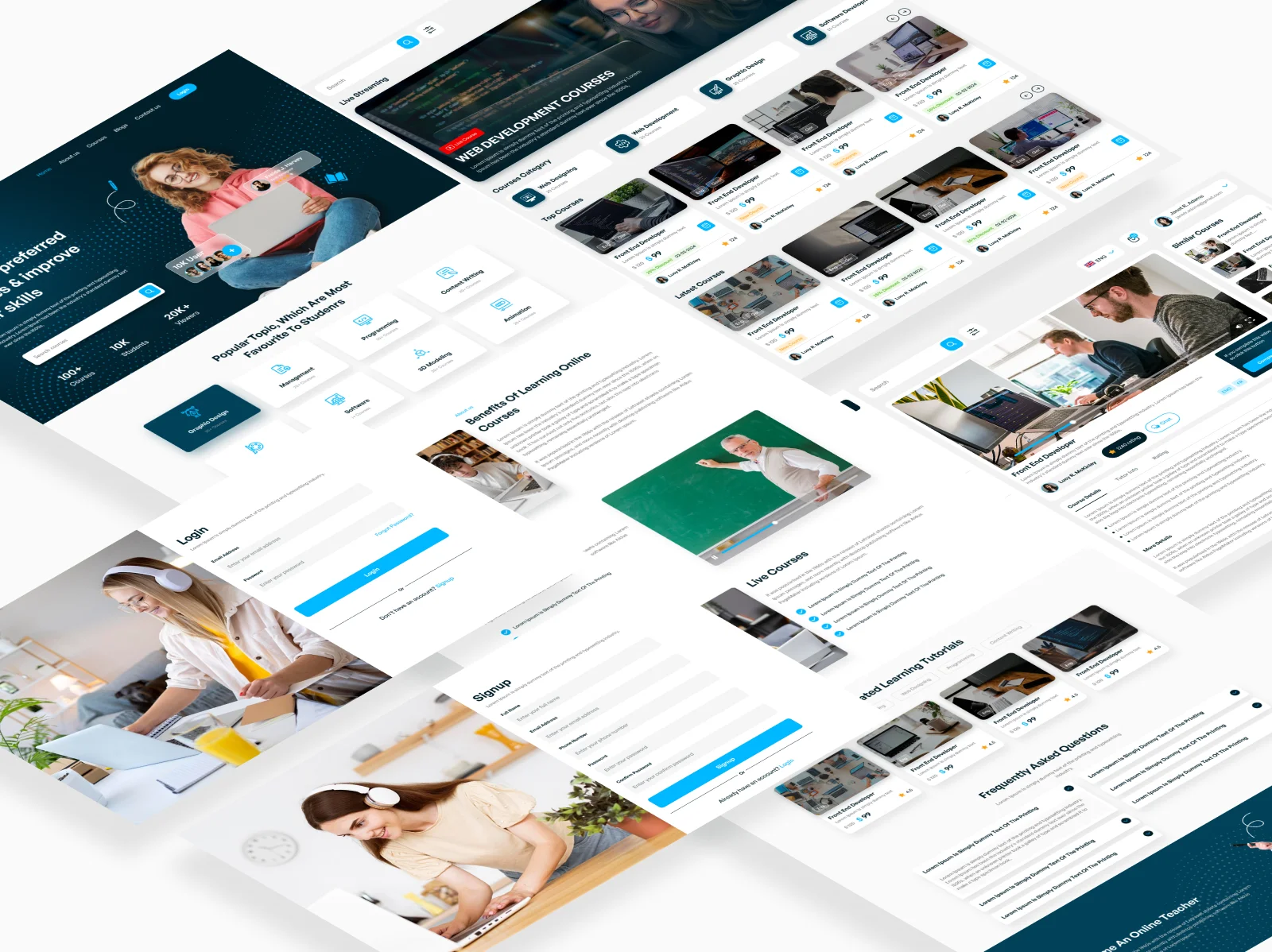
MyLearnPlace
Course Marketplace Germany
- A commercial learning marketplace where approved instructors publish paid video courses and users search, buy, and watch — with the platform operator running approval, payment, and payouts.
- Protected video delivery. Purchased courses are viewable on the platform only and can’t be downloaded. This is what most learning platforms get wrong by embedding a public video host; doing it properly means tokenised streaming with access checks on every request, not an unlisted URL. When the content is the product, this is the product.
- Preview before purchase. Each course carries a second short video alongside the main content, so a buyer can sample the material and the teaching style before paying. Small feature, outsized effect on conversion and refund rates.
- Purchase, invoice, then access. PayPal, credit card, and Apple Pay. An invoice is generated on purchase and course access unlocks once payment clears, with purchases collected in the buyer’s account. Entitlement is enforced at playback rather than assumed after checkout.
- Instructor onboarding and payouts. Approved instructors publish their own courses, with support queries from their students routed directly to them. The operator sees all purchases in the backend and releases instructor earnings via PayPal against a generated invoice — so the marketplace settles its supply side without manual reconciliation.
- Admin approval as the quality gate. Instructors publish only after admin approval. On a marketplace selling knowledge, the approval gate is the product — reputation is the only thing a buyer can judge before purchase.
- Live streaming with moderated chat. Operators publish live sessions that appear on the landing page with their own summary and image, so users can judge relevance. Opted-in users receive an invitation email with a join link. Participants ask questions in a live chat admins can moderate or disable, and sessions are archived for re-running rather than being one-time assets.
- Ratings that drive discovery. Buyers rate courses 1–5 stars with written comments, and ratings feed the search filters alongside language, category, and date — so quality affects what gets found, not just what gets read.
- Three-tier access model. Admin, operator, and instructor/user roles, with content management, platform control, and publishing rights properly separated.
- Support built in. An email ticket system across the whole support volume plus an FAQ layer, with course-specific queries routed from the player to the instructor who published it.
- Bilingual and fully responsive. German and English throughout, on desktop, tablet, and phone.
- Instructors approved
- courses published
- users
- live sessions delivered
- preview-to-purchase conversion
- instructor payouts processed
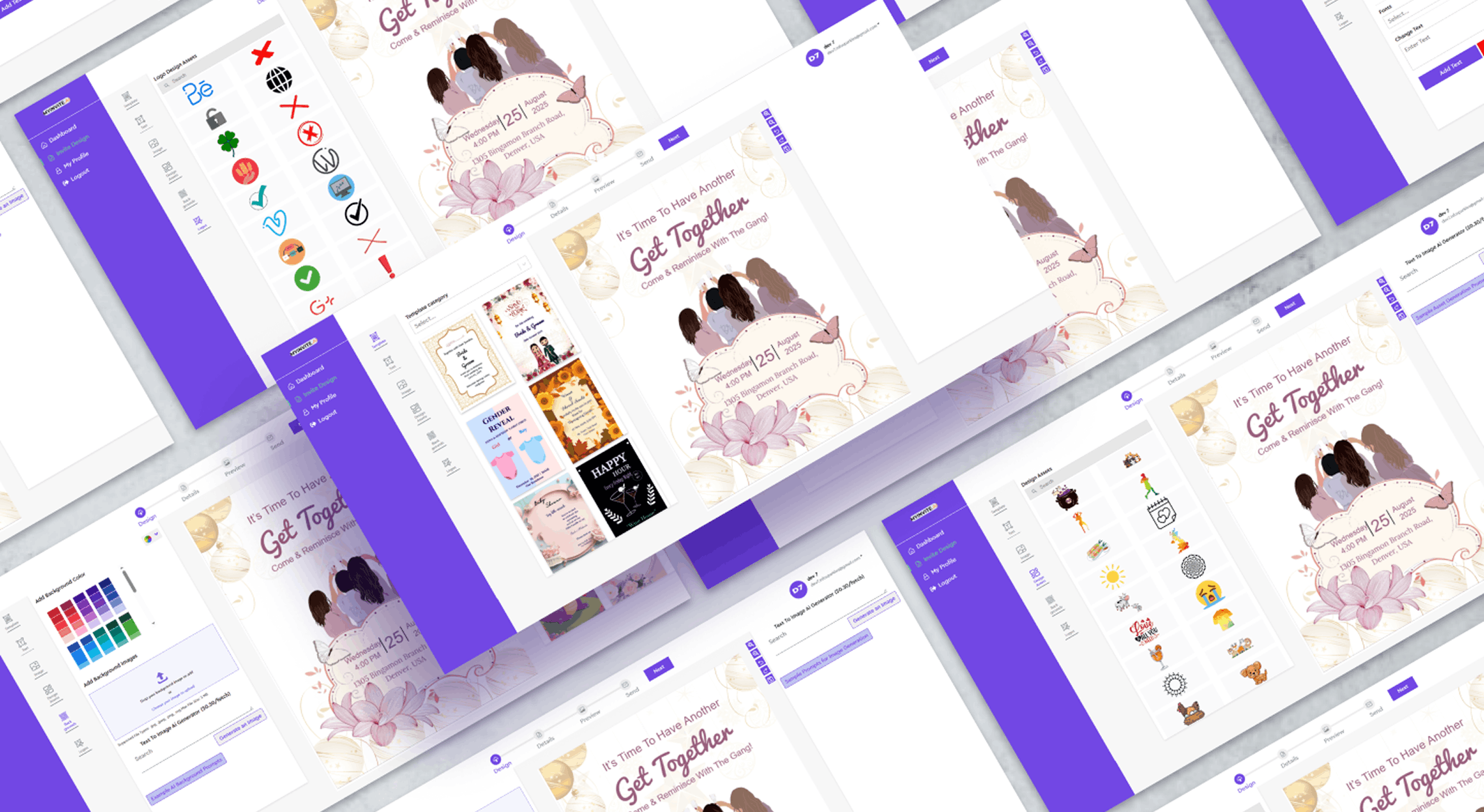
MyInvite
Digital Invitation SaaS USA
- A digital invitation platform with an AI-powered invite builder. Users pick from designed templates for birthdays, anniversaries, and weddings, customise colour, logo, shapes, fonts, and text, then build a recipient list and send invitations directly through the platform.
- Usage-based billing. Pricing scales with recipient count rather than a flat subscription, which aligns cost to value but requires metering, entitlement enforcement, and billing that reconciles against actual send volume.
- The hard parts: A customisation engine that keeps templates coherent under user editing, AI-assisted generation inside brand and layout constraints, deliverability at volume, and metering tied to billing.
What We Build
Capabilities

ERP – Operations
Project and job costing, estimation and quotation, procurement and purchase orders, subcontractor and vendor management, inventory and fleet, document control, finance. Built around your workflow chain, not a module catalogue.

CRM – Revenue
Pipeline and deal management, quoting, customer history, task and activity tracking, and the industry-specific object models generic CRM lacks — unit-level stock, consignment relationships, buyer requirement registers.

HRMS – People
Employee records, attendance and leave, payroll integration, appraisals, document and compliance tracking.

Learning Platforms & Course Marketplaces
Course authoring and catalogue structure, search and faceted filtering, enrolment, assessment and certification, progress reporting, ratings and reviews, instructor publishing with approval gating, and multi-tenant delivery for providers serving multiple organisations.

Secure Content Delivery
Tokenised video streaming, download prevention, entitlement checks at playback, preview and trailer assets, and DRM where content value justifies it. If you’re selling digital content, this is the system — everything else is a storefront on top of it.

Live Streaming & Real-Time Sessions
Live session scheduling and publishing, invitation and opt-in handling, moderated in-session chat, recording, and archive for replay. Also: WebRTC audio and video calling — see Adhya Universe on the Marketplace page.
Billing & Entitlement
Subscription billing, usage-based metering, invoice generation, payment-gated access, plan and entitlement enforcement, and reconciliation between what was used and what was charged.
Creator & Supplier Payouts
Supply-side onboarding with approval gating, earnings tracking per creator, invoice generation, and operator-released payouts. Plus support routing, so buyer questions reach the person who made the thing rather than a central queue that can’t answer them.
Multi-Tenant SaaS
Tenant isolation and data separation, self-service onboarding, per-tenant configuration and branding, and admin tooling for your own team.
Reporting & Decision Support
Dashboards built around the decisions that get made, not every metric available. Struct surfaces the enquiry-to-project pipeline; Wowin surfaces stock position and margin. Both were designed backwards from a daily decision.
Integration Layer
Two-way sync with accounting, payroll, commerce, and the systems you’re keeping. A custom system that doesn’t talk to your existing stack is just another silo.
Where AI Fits
AI Where It Earns Its Place
Internal systems are where AI has the clearest payoff, because the data is already structured and the manual work is visible.
01
Document processing
Extract data from invoices, purchase orders, delivery notes, and registration paperwork instead of typing it. Wowin’s document scanning is the natural extension point.
02
Estimation support
Surface comparable historical costs while a quote is being prepared, which in construction is where margin is won or lost
03
Anomaly detection
Flag cost overruns, unusual purchase patterns, and margin erosion as they happen rather than at month-end
04
Forecasting
Cash flow, stock turnover, and resource demand from your own history
05
Natural-language reporting
Ask a question, get the answer, instead of building a report
06
Content intelligence
Transcription, search inside video, auto-generated summaries and chapters, and recommendations across a course catalogue
07
Generative content
MyInvite’s AI builder is this pattern applied to a customer-facing product
Custom or Off-the-Shelf
When You Shouldn’t Build Custom
The wrong answer here is expensive, so here’s ours.
Use Zoho, Odoo, HubSpot, or Dynamics if: your processes are broadly standard, per-seat licensing is affordable at your headcount, and configuration gets you most of the way. Faster and cheaper, and you don’t need us.
Use Teachable, Kajabi, or Thinkific if: you’re selling courses and their feature set covers you. Build custom when it doesn’t — protected video on your own terms, live streaming with moderated chat and an archive, ratings feeding search, or a marketplace model with instructor payouts and your own commission structure.
Extend an off-the-shelf platform if: the core fits and one or two areas don’t. A custom module against a standard core is often the best value, and we do that work.
Build custom when: your core workflow has no good market equivalent — construction estimation and subcontract management, or unit-level consignment stock, being two real examples — or when licensing has overtaken build cost, or the process you can’t change is the one your advantage depends on.
The workflow review tells you which, including when the answer is “configure what you have.”
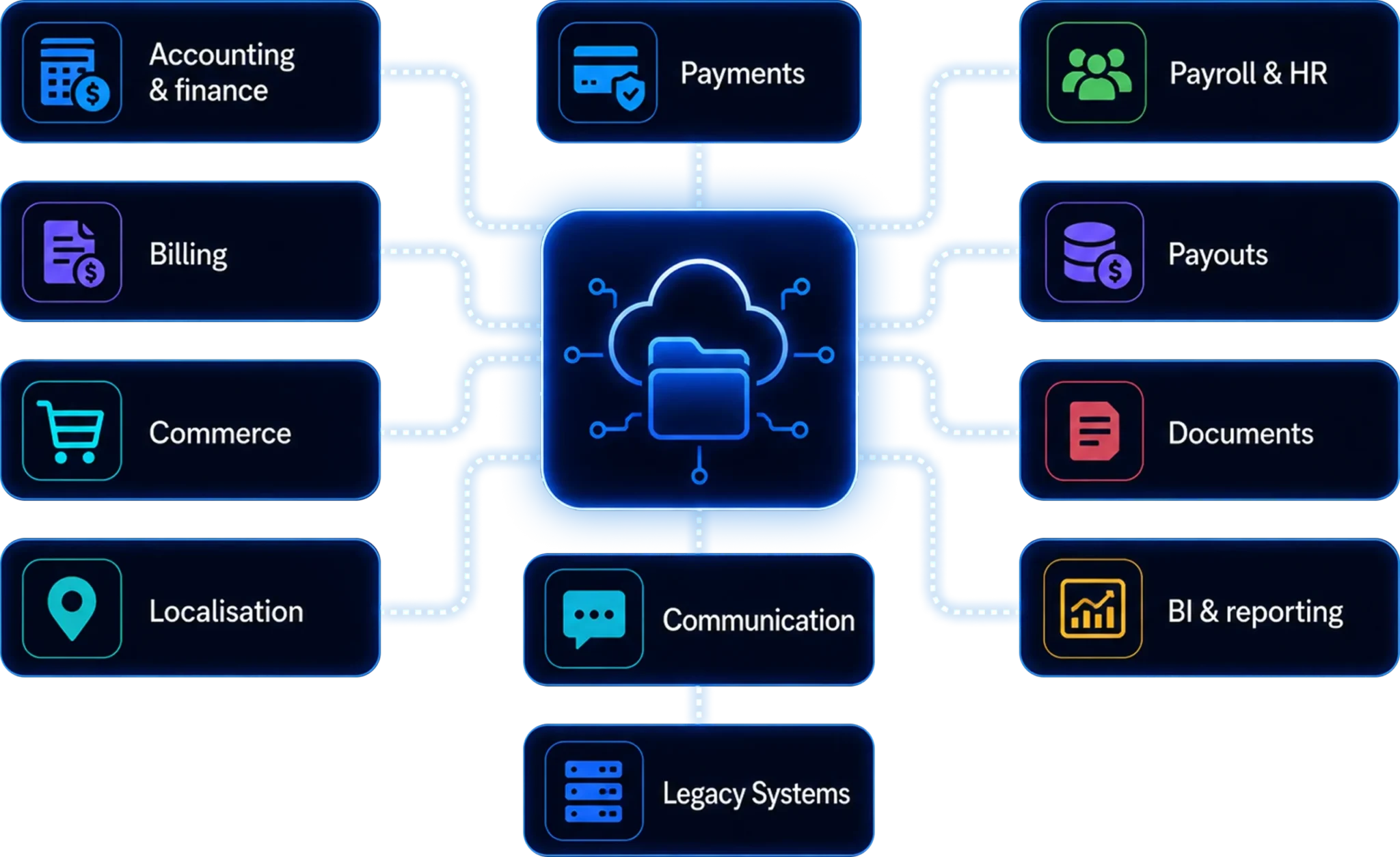
Integrations
Connected to What You’re Keeping

Accounting & finance
Zoho, Xero, QuickBooks, Sage, Tally, SAP

Payroll & HR
Regional payroll providers, attendance and biometric devices

Payments
PayPal, Stripe, Adyen, credit card, Apple Pay, Google Pay, regional gateways

Billing
Subscription and usage-based metering, invoicing, dunning

Payouts
PayPal and equivalents for creator and supplier settlement

Video & streaming
Encoding pipelines, tokenised CDN delivery, live ingest, DRM providers

Commerce
Your storefront, so orders and stock don’t diverge (see Enterprise eCommerce)

Documents
Scanning and OCR, e-signature, cloud storage

Communication
email, SMS, WhatsApp Business API, Slack and Teams notifications

Localisation
Centrally maintained i18n for multilingual platforms

BI & reporting
Power BI, Looker, or reporting built into the platform

Legacy Systems
Database-level or file-exchange integration where no API exists
Process
How a Systems Project Runs
01
Systems & Workflow Review
Free, 1 to 2 Weeks We map your current tools, where data lives, and the workarounds your team has built to compensate. You get a written findings document: which processes should be one system, what to keep, what to replace, and an honest build-versus-configure recommendation. Yours to keep either way.
Building a product rather than an internal system? The same session covers your billing model, access and entitlement rules, and content protection requirements – the three decisions hardest to change later.
02
Process Mapping
3 to 5 Weeks Your actual workflow documented in one place, usually for the first time. On Struct that meant tracing enquiry through estimation, quotation, subcontract, and procurement to project cost. This phase surfaces the disagreements about how the business works — better now than mid-build.
03
Module Architecture & Data Model
Modules, roles, permissions, and the shared data model. Internal systems live or die on the data model; products live or die on the access model. Both are effectively permanent once you have real users.
04
Phased Build
12 to 24 Weeks Highest-pain module first, in production, being used. Struct’s twelve modules weren’t built simultaneously and shouldn’t have been – each release earns the next.
05
Migration & Parallel Running
Historical data migrated, old and new running together while confidence builds. Nobody switches off the system that runs their business on a promise.
06
Scale & Optimise
Training, documentation, and a feedback loop through the first quarter. An internal system people work around is a failed project regardless of build quality.
Why Infosparkles
Why Teams Bring Us In
01
We build vertical, not generic.
Struct models construction’s estimation-to-procurement chain. Wowin models consignment stock and per-vehicle margin. Neither is a configured template — both start from how the industry actually operates.
02
We’ve shipped at real scope.
Twelve integrated modules spanning commercial, operational, financial, and HR functions in one platform.
03
We protect content that has value.
Tokenised video delivery, download prevention, and entitlement enforced at playback. If your product is the content, this is the product.
04
We’ve built live and real-time into products.
Moderated live streaming with archive on MyLearnPlace; WebRTC audio and video on Adhya Universe.
05
We settle supply sides.
Approval gating, per-creator earnings tracking, invoice generation, and operator-released payouts — the same machinery behind eight multi-sided platforms across our portfolio.
06
We build both internal systems and products.
So we can tell you honestly which one you’re actually asking for — founders often describe an internal tool and mean a product, or the reverse.
07
We integrate rather than replace.
Your accounting, payroll, and commerce systems stay if they’re working.
08
We plan for adoption.
The most common way an internal system fails has nothing to do with code.
09
You own it outright.
Full source, documentation, deployment access, no per-seat licence, no dependency on us.
Frequently Asked Questions
Both. Struct is a twelve-module construction ERP covering marketing, estimation, subcontractors, purchase, documents, finance, HR, fleet and inventory, projects, and reporting. We build in phases, highest-pain module first, so value arrives before the whole thing is finished.
That’s the work. Process mapping is a dedicated phase — it’s how Struct came to model construction’s estimation-to-subcontract chain and Wowin came to model consignment stock and per-vehicle margin. Neither came from a template.
Yes. MyLearnPlace is a live German course marketplace with paid access, protected video, preview clips, live streaming with moderated chat, ratings feeding search, instructor publishing, and PayPal, card, and Apple Pay checkout.
Yes. MyLearnPlace runs admin-approved instructor publishing, per-instructor support routing, and operator-released PayPal payouts against generated invoices.
The operator sees all purchases in the backend, generates an invoice, and releases the instructor’s earnings via PayPal. Earnings are tracked per creator, so settlement doesn’t require manual reconciliation.
Yes. Tokenised streaming with entitlement checks at playback, so content is viewable on the platform and not downloadable. Embedding a public video host – which is what most learning platforms do — doesn’t achieve this.
Yes. MyLearnPlace operators publish live sessions with opt-in invitations, participants ask questions in a chat admins can moderate or disable, and sessions are archived so they can be re-run rather than being one-time assets.
Admin approval before publishing, plus ratings and comments that feed the search filters. On a marketplace selling knowledge the approval gate is the product – it’s the only quality signal a buyer has before paying.
Use them if their feature set covers you – cheaper and faster. Build custom when it doesn’t: content protection on your own terms, live streaming with archive, ratings driving discovery, or a marketplace model with instructor payouts and your own commission structure.
Configure if your processes are broadly standard and licensing is affordable. Build custom when your core workflow has no good market equivalent, or licensing has overtaken build cost. The review gives you a straight answer, including “configure what you have.”
Yes, and it’s often better value. A custom module against a standard core solves the gap without a migration.
Yes. MyInvite is live with usage-based billing tied to send volume, including metering and entitlement enforcement. Tenant isolation, self-service onboarding, and per-tenant branding are standard.
Both. MyInvite bills on recipient volume; MyLearnPlace gates access per purchase with invoice generation. Metering, entitlement enforcement, and reconciliation are the parts that need designing early.
Yes — MyLearnPlace runs German and English throughout, on desktop, tablet, and phone.
Yes – Zoho, Xero, QuickBooks, Sage, Tally, SAP, and regional payroll providers, two-way.
First module or MVP in production typically 3–4 months; a full multi-module platform 6–12 depending on scope. Phased delivery means you’re using it long before it’s complete.
Migrated, with old and new running in parallel until you’re confident. No cutover on a promise.
That’s the real risk, and we plan for it – training, documentation, and a feedback loop through the first quarter. Systems fail on adoption more often than on engineering.
You do, on delivery. Full source, documentation, and deployment access. No per-seat licence.
It covers two kinds of custom software: internal business systems ERPs, CRMs, and workflow platforms shaped to how your company operates and SaaS products you take to market, built multi-tenant with subscriptions, usage billing, and self-service onboarding. One runs your business; the other is your business.
Find Out Which Systems Should Be One System
Book a free workflow review. We’ll map your current tools, the data gaps between them, and the workarounds your team has built — then send you a written recommendation on what to build, what to keep, and whether you need a custom system at all. Yours to keep, no obligation.
Building a product rather than an internal system? Same session — we’ll cover your billing model, access rules, and content protection instead.